Prop-5 User Manual
Note: This is a Markdown file. If you find the PDF version easier to read, please refer to the docs_PDF folder.
Prop-5 is a polyphonic synthesizer audio plugin (VST3 / Standalone formats) developed using the JUCE framework, inspired by the classic analog synthesizer "Prophet-5".
1. Disclaimer & Trademarks
- Prophet-5 and Sequential are registered trademarks of Sequential LLC.
- This software is an unofficial, independent fan-made clone/emulator and is not affiliated with, endorsed by, sponsored by, or associated with Sequential LLC or its affiliates in any way.
2. System Requirements, Installation & Operation
2.1 System Requirements
- OS: Windows 10 / 11 (64-bit)
2.2 Installation Steps
- Run the official installer (
Prop-5_v[Version]_Setup.exe). - Follow the on-screen instructions. You can choose which components to install:
- Full Installation: Installs both the VST3 plugin and the Standalone application. (Recommended)
- Standalone Only: Installs only the Standalone application.
- VST3 Only: Installs only the VST3 plugin.
- Once installation is complete, restart or re-scan your DAW (Cubase, Ableton Live, Studio One, Reaper, etc.), and the plugin will be recognized automatically.
Note: The VST3 plugin will be installed to C:\Program Files\Common Files\VST3\Prop-5.vst3,
and the Standalone application will be installed to C:\Program Files\Prop-5\.
2.3 Running the Application
- VST3 Plugin: Insert "Prop-5" from your DAW's plugin list.
- Standalone Application: Launch "Prop-5" from the desktop shortcut or the Start menu. After launching, click the "SETTINGS" button at the bottom of the window to configure your audio/MIDI device settings.
2.4 Uninstallation
Go to Windows Settings > Apps > Installed apps, select Prop-5, and click Uninstall. The related files will be automatically removed.
3. Interface & Basic Operation
The interface mimics the layout of a classic analog synthesizer. The sound synthesis sections (OSCILLATOR, MIXER, FILTER, ENVELOPES) and global controls (GLOBAL) are located at the top/main area, while the preset management area (PRESET) and settings button (SETTINGS) are located at the bottom.
3.1 Preset & Utility Area (Bottom Bar)

- PRESET ComboBox: Click to view and select from factory presets and user presets.
</>(PREV / NEXT Buttons): Switch to the previous or next active preset.- RESET Button: Resets the edited parameters back to the initial state of the currently selected preset.
- SAVE Button: Saves the current settings as a user preset file (extension:
.prop5). - LOAD Button: Manually loads a saved
.prop5preset file. - SETTINGS Button: Opens the settings overlay where you can adjust the following:
- Preset Folder: Select a folder for scanning and saving user presets. You can also reset it to the default folder.
- Window Scale: Resize the plugin window interface (e.g., from 1.0x to 2.0x).
4. Section & Parameter Specifications
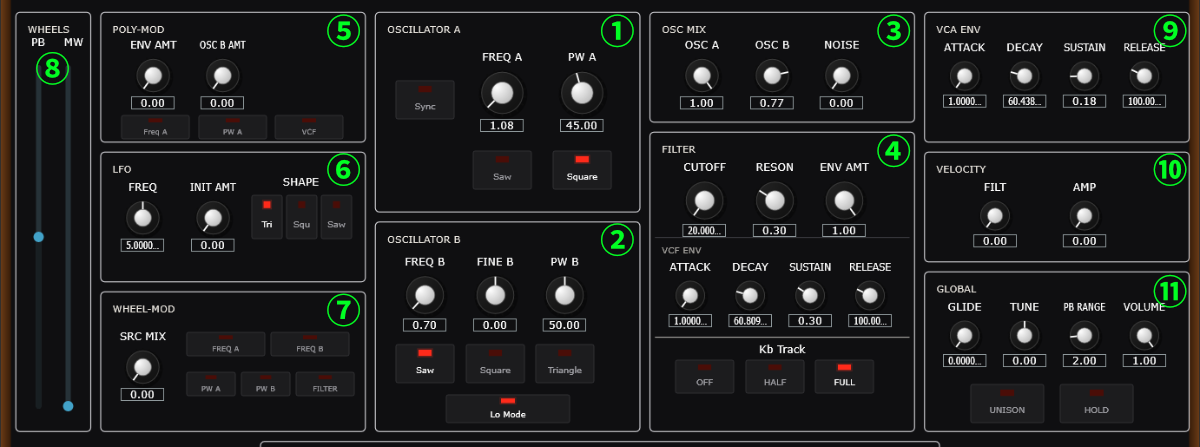
4.1 OSCILLATOR A (①)
- FREQ A (0.0625 to 32.0): Sets the base pitch (octave) of Oscillator A.
- PW A (5% to 95%): Adjusts the pulse width of the square wave (default: 50%).
- Sync (ON / OFF): Synchronizes Oscillator A to Oscillator B. Oscillator B acts as the master, and Oscillator A as the slave. Modulating the pitch of Oscillator A creates classic, sharp sync tones.
- Saw (ON / OFF): Enables the sawtooth wave output.
- Square (ON / OFF): Enables the square wave output (reflects the PW setting). (Note: Saw and Square waves can be active simultaneously and will be mixed together.)
4.2 OSCILLATOR B (②)
- FREQ B (0.0625 to 32.0): Sets the base pitch of Oscillator B.
- FINE B (-1.0 to +1.0): Fine-tunes the pitch of Oscillator B. Slightly detuning it against Oscillator A creates a rich chorus effect.
- PW B (5% to 95%): Adjusts the pulse width of the square wave (default: 50%).
- Saw (ON / OFF): Enables the sawtooth wave output.
- Square (ON / OFF): Enables the square wave output.
- Triangle (ON / OFF): Enables the triangle wave output.
- Lo Mode (ON / OFF): Low-frequency mode. When enabled, Oscillator B runs at a very low frequency, functioning as an extra LFO (primarily used as a modulation source via Poly Mod).
4.3 OSC MIX (③)
- OSC A (0.0 to 1.0): Adjusts the volume of Oscillator A.
- OSC B (0.0 to 1.0): Adjusts the volume of Oscillator B.
- NOISE (0.0 to 1.0): Adjusts the volume of the white noise generator. Useful for sound effects and percussive tones.
4.4 FILTER (④)
Simulates an analog low-pass ladder filter.
- CUTOFF (20 Hz to 20,000 Hz): Sets the cutoff frequency of the filter. High frequencies above this point are filtered out (uses a logarithmic scale).
- RESON (0.0 to 1.0): Emphasizes the frequencies around the cutoff point, adding sharpness or a nasal quality to the sound.
- ENV AMT (0.0 to 1.0): Controls how much the filter envelope (VCF ENV) modulates the cutoff frequency.
- VCF ENV (Filter Envelope): An ADSR envelope that controls the modulation of the VCF
Cutoff over time. The times can be adjusted from 1ms up to 15 seconds (15000 ms).
- ATTACK: Time taken for the cutoff to reach its peak after a key is pressed.
- DECAY: Time taken for the cutoff to drop from the peak to the Sustain level.
- SUSTAIN (0.0 to 1.0): The level at which the cutoff is held while the key is pressed.
- RELEASE: Time taken for the cutoff to return to its initial state after the key is released.
- Kb Track (OFF / HALF / FULL): Controls how much the cutoff frequency tracks the pitch of the keys played. Useful for keeping high notes bright.
4.5 POLY-MOD (⑤)
A modulation routing system applied independently per voice.
- ENV AMT (0.0 to 1.0): The amount of modulation from the Filter Envelope (VCF ENV).
- OSC B AMT (0.0 to 1.0): The amount of modulation from Oscillator B's output.
- Destination Switches:
- Freq A (ON / OFF): Modulates the frequency (pitch) of Oscillator A (for FM-style sounds).
- PW A (ON / OFF): Modulates the pulse width of Oscillator A.
- VCF (ON / OFF): Modulates the filter cutoff frequency.
4.6 LFO (⑥)
A global low-frequency oscillator for periodic modulation.
- FREQ (0.1 Hz to 30.0 Hz): Sets the speed of the LFO.
- INIT AMT (0.0 to 1.0): Sets a baseline modulation amount applied even when the mod wheel is down.
- SHAPE (Tri / Squ / Saw Buttons): Selects the LFO waveform (Triangle, Square, Sawtooth).
4.7 WHEEL-MOD (⑦)
A global modulation routing system scaled by the Mod Wheel (MIDI CC#1).
- SRC MIX (0.0 to 1.0): Blends the modulation source between LFO and Noise
(
0.0for LFO only,1.0for Noise only). - Destination Switches:
- FREQ A (ON / OFF): Modulates the frequency of Oscillator A (vibrato effect, etc.).
- FREQ B (ON / OFF): Modulates the frequency of Oscillator B.
- PW A (ON / OFF): Modulates the pulse width of Oscillator A.
- PW B (ON / OFF): Modulates the pulse width of Oscillator B.
- FILTER (ON / OFF): Modulates the filter cutoff frequency (wah-wah effect, etc.).
4.8 WHEELS (⑧)
- PB (Pitch Bend) (-1.0 to +1.0): Temporarily controls pitch bends; returns to center automatically.
- MW (Modulation Wheel) (0.0 to 1.0): Blends in the amount of modulation routed in the WHEEL-MOD section.
4.9 VCA ENV (⑨)
An ADSR envelope that controls the volume level over time. The times can be adjusted from 1ms up to 15 seconds (15000 ms).
- ATTACK: Time taken for the volume to reach its peak.
- DECAY: Time taken for the volume to drop from the peak to the Sustain level.
- SUSTAIN (0.0 to 1.0): The volume level held while the key is pressed.
- RELEASE: Time taken for the volume to fade out completely after the key is released.
4.10 VELOCITY (⑩)
- FILT (0.0 to 1.0): Determines how much key velocity affects the VCF Cutoff.
- AMP (0.0 to 1.0): Determines how much key velocity affects the VCA ENV.
4.11 GLOBAL (⑪)
- GLIDE (0.0 to 5000.0 ms): Adjusts the portamento (glide) time between notes.
- TUNE (-1.0 to +1.0): Fine-tunes the master pitch.
- PB RANGE (0.0 to 12.0): Sets the maximum pitch bend range (PB) in semitones (default: 2.0, up to 1 octave).
- VOLUME (0.0 to 1.0): Adjusts the final output volume of the plugin.
- UNISON (ON / OFF): Layers all voices together for a thick, powerful sound.
- HOLD (ON / OFF): Bypasses the VCA ENV, causing notes to play continuously at maximum volume when keys are pressed (toggles the internal VCA Mode). Useful for organ-like sustained tones.
5. Preset & Settings Directories
User presets are saved in the default operating system Documents folder.
- Default Path:
C:\Users\[Username]\Documents\Prop-5\Presets\
You can change this path to external storage or any other directory by clicking "Select Folder" in the SETTINGS menu. You can reset it to the default folder at any time by clicking "Default Folder".